


Check in, repair, hand back, get paid
all in one app.
FoneCare replaces your shop's notebook and spreadsheets: repair tickets with checklists and device photos, quotes sent to customers via Zalo, parts stock tracked by IMEI/serial, shift cash book and revenue reports, right on your phone or tablet.
- Works without internet
- Prints 58/80mm thermal receipts
- Notifies customers via Zalo / SMS
- iOS, Android & tablet
- Works offline
- Bluetooth / LAN thermal printing
- Get paid via VietQR
- Notify customers via Zalo / SMS
The busier the shop, the more a notebook misses
Everyday problems at phone repair shops, and how FoneCare handles each one.
Tickets written in a notebook; when a customer asks about their phone, you have to dig for it.
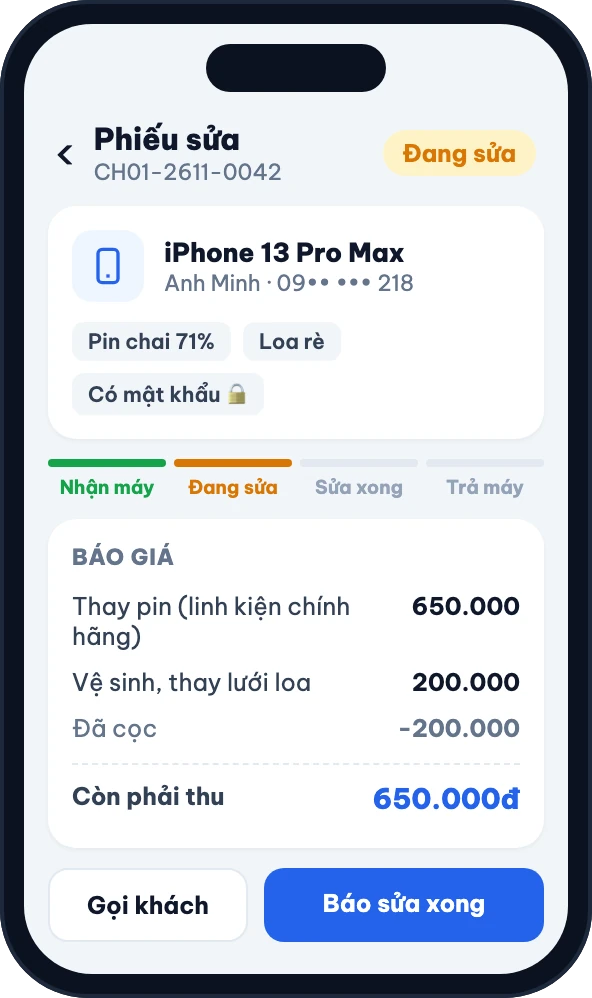
Every device gets a numbered ticket with a clear status. Customers scan the QR code on the receipt to check for themselves.
Customers insist "it wasn't scratched when I dropped it off", and there is nothing to show.
Condition checklist and device photos taken at check-in, saved right on the ticket.
No idea how many batteries or screens are left; missing parts go unnoticed.
Stock by quantity or by serial, deducted automatically when issued to a ticket, with low-stock alerts.
End-of-day cash never matches the book; customer debts are scattered everywhere.
Shift cash book with open/close, per-customer debts and instalments, revenue visible the same day.
Track every device from check-in to hand-back
A repair ticket follows the exact steps your shop already uses every day. Click each step to see how the app helps.
3-step intake, nothing missed
The front desk creates a ticket at the counter: device condition, photos and a first quote from your price list.
- Condition checklist (screen, body, camera, Face ID…) using your shop's template
- Photos at check-in to compare when handing back
- Passcode / iCloud stored encrypted, visible only to authorised staff
- Print an intake receipt with a QR code for the customer

Send a quote, customers approve online
Look up the price by model, then send a quote link via Zalo/SMS. Customers review it and tap "Approve", no call-back needed.
- Repair price list by brand and model; Excel import/export
- Multi-line quotes, take a deposit right on the ticket
- Customer declines: charge an inspection fee and close the ticket
Technicians pick up jobs, stock updates itself
Technicians see their assigned devices; once a repair starts, the planned parts are issued from stock by serial.
- Assign tickets to each technician, internal notes
- Request / issue parts and reserve stock for the ticket
- Every status change is logged
Repair done, customer knows right away
Mark the ticket "Repaired" and FoneCare automatically invites the customer to pick up via your shop's Zalo or SMS.
- Automatic Zalo messages: repair done, quote, invoice, reminders
- Message templates in your shop's own voice
- Reminders when a ticket is close to its due date
Invoice, warranty and payment in one step
Create the invoice from the ticket, accept cash, VietQR transfer or instalments; warranty attached to each line.
- One invoice, multiple payment methods, discount codes
- Warranty in days for each part / service
- Record debts or split into instalments for regulars
Everything a phone repair shop needs
Not a generic sales app: every screen is built for the front desk, the repair bench and the parts shelf.
Repairs
5-status repair tickets, checklists, photos, quotes, deposits, price list by model and quick price lookup.
Point of sale
Barcode scanning, sell phones by IMEI, held orders, returns and exchanges.
Parts inventory
Stock by quantity or serial (FIFO, cost price), purchasing, stock counts, transfers, supplier returns.
Cash book & debts
Non-invoice income and expenses, shift open/close, customer and supplier debts, multi-period instalments.
Customers
Customer profiles with repair, purchase, warranty and debt history, shared across stores.
Staff & permissions
6 built-in roles, create your own; a PIN for every staff member, with an activity log.
Reports
Revenue, cash flow, stock, technician performance, store comparison; Excel export.
Printing
Bluetooth/LAN thermal or A5 printers, design your own receipt, QR tracking code included.
Multiple stores
Business → stores → warehouses, document numbers per store, price lists by region.
A screen for everyone in the shop
The app home screen adapts to each role; staff only see what they are allowed to.
Know how the shop is doing, even away from the counter
Today's revenue, devices in repair, cash in the drawer and pending tasks, right on the home screen.
- Revenue, cash flow and stock reports
- Technician performance and commissions
- Activity log, signed-in device management
Know which device to fix first
Technicians only see their assigned tickets, due times and parts to collect; update status with one tap.
- Tickets sorted by due time
- See the check-in checklist and photos
- Request parts from stock right on the ticket
Fast check-in, sell accessories without a POS terminal
Create tickets, look up prices, take payments and sell at the counter on one device; everyone signs in with their own PIN.
- Quick price lookup by model
- Barcode scanning, sell phones by IMEI
- VietQR payments, thermal invoice printing
Customers check for themselves, fewer calls for you
Intake receipts carry a QR code. Customers scan it to see which step their device is at and how much it costs, without exposing IMEI, phone number or passcode.
Your shop connects its own Zalo account; message templates are editable. SMS is available as an alternative.
Try it free for 30 days, pick a plan once you're comfortable
One shop, one device: choose Offline. Need remote access or multiple devices: choose Cloud. Switch plans without losing data.
Offline
Full shop management, no internet needed
- Full repairs, invoicing and point of sale
- Cash book, stock counts, IMEI / serial inventory
- A PIN for every staff member on the same device
- Full reports, on-device reminders
- Data backup, upgrade to Cloud any time
Cloud
Data in the cloud, use it on many devices
- Everything in Offline
- Send quotes via SMS / link, customers approve online
- Customer debts, stock transfers, regional price lists
- Custom roles, fine-grained permissions
- View tickets and reports from anywhere
Multi-store chains
2–10 stores sharing customers and stock.
- Each store has its own stock and document numbers
- Stock transfers between stores
- Store comparison reports, restock planning
Pay via the App Store / Google Play inside the app. After expiry you still get a 7-day grace period to renew.
Frequently asked questions
What is the difference between Offline and Cloud?
Offline keeps data on the device, for 1 store on 1 device, with multiple staff signing in by PIN and no internet required. Cloud stores data on our servers, works on many phones/tablets at once and lets you view reports from anywhere, plus SMS quotes, customer debts and fine-grained permissions.
If I start on Offline, will I lose data when moving to Cloud?
No. The app can push all Offline data to Cloud when you upgrade; tickets, stock and customers are kept as they are.
Which printer do I need?
FoneCare prints on 58mm or 80mm ESC/POS thermal printers over Bluetooth or LAN, and A5 on regular printers. Receipt templates are customisable, with Vietnamese text and a QR tracking code.
How do customers check their repair status?
The intake receipt includes a QR code. Customers scan it to see the status, repair history and quote, and can approve the quote online. The tracking page hides IMEI, phone number and device passcode.
Can staff see revenue and cost prices?
Only if you allow it. The app has 6 default roles (owner, manager, technician, front desk, warehouse, data entry), and the Cloud plan lets you create your own roles permission by permission. Every action is logged.
Is the trial free? How do I pay?
Every plan comes with a 30-day trial. After that you pay inside the app via the App Store or Google Play, every 1, 6 or 12 months.
Download the app and check in your first device today
Sign up with your phone number, set up your store and start taking repairs. The first 30 days are free on every plan.